SPYPOINT
- 4.4
- Rating
- 1.00M
- Installs
- Free
- Price

 Analysis by App-foxy
I have always found cellular trail cameras most useful when they remove one specific chore: walking into the woods just to see whether anything happened. SPYPOINT takes that idea and puts it into a mobile app built around managing compatible SPYPOINT cellular trail cameras, then receiving the photos and videos they capture. In my experience, that makes it less like a general photography app and more like a remote field-monitoring tool for hunters, landowners, wildlife observers, and anyone who needs to check a camera without disturbing the area.
The app is free and sits in the sports category, although its practical value reaches beyond hunting. I can see it helping someone watch a feeding area, monitor a remote property, inspect a trail, or keep an eye on seasonal wildlife activity. Its audience is fairly specific, though. If you do not own a compatible SPYPOINT cellular camera, there is little reason to install it. This is not a replacement for a normal camera gallery, a cloud drive, or a phone-based wildlife camera.
How SPYPOINT feels in everyday use
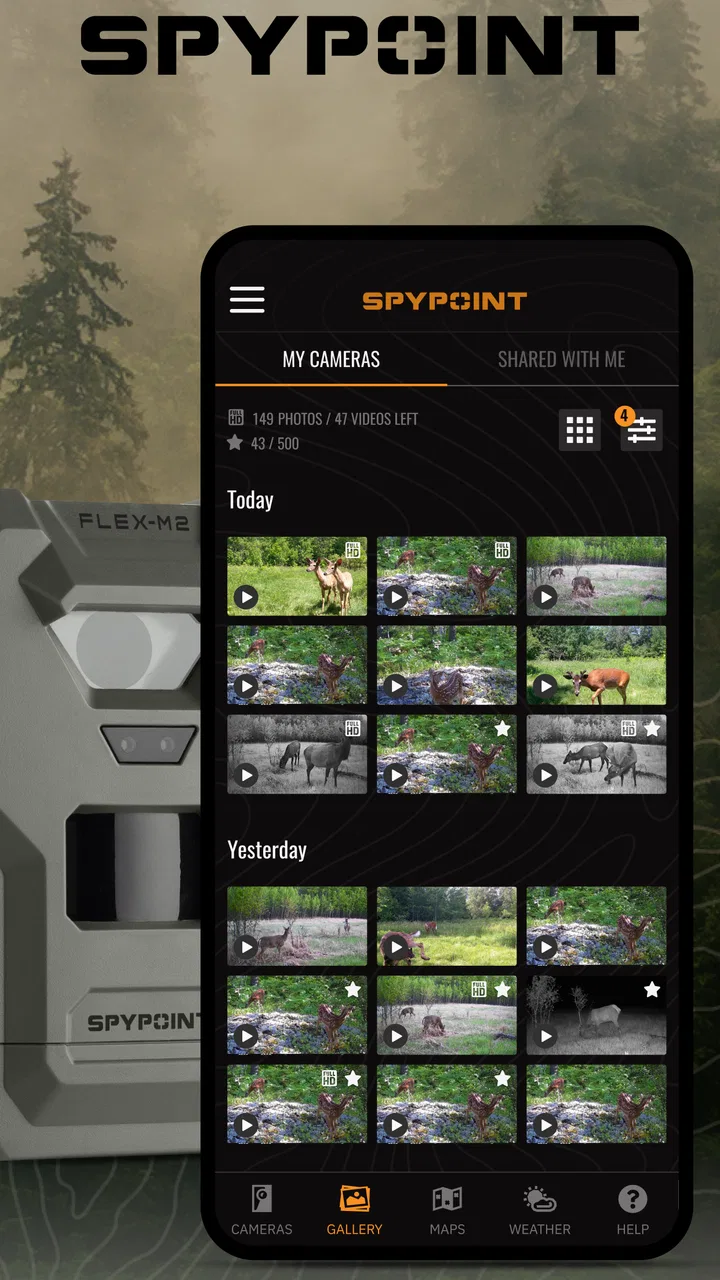
The central experience is straightforward: connect the app to your SPYPOINT cellular trail cameras, use the camera information available in the app, and review incoming photos or videos from a phone. That remote access is the important part. A traditional trail camera usually asks you to visit the location, remove a memory card, and sort through files later. With this app-based setup, the camera can send the useful moments to you instead.
You May Also Like

 Blood Strike: 2.5 Anniversary
Blood Strike’s Loadouts Turn Every Drop Into a Tactical Gamble
A close look at Blood Strike’s custom loadouts: how fast access to signature weapons reshapes its battle royale rhythm, rewards preparation, and narrows the gap between fights.

 Pandora - Music & Podcasts
Pandora’s Music Is Easy to Start, but Harder to Recover
Pandora’s strength is its low-effort path from a seed to a station. Its weak spot is how much confidence it asks you to place in connection, setup, and quiet recovery.

 8 Ball Pool
 Is Built on Rivalries, Rematches, and Routine
A close look at the rivalries, rematches, shared routines, and unanswered safety questions that turn a quick pool match into a persistent mobile community.

 Samsung Music
’s Quiet Strength Is Playing What You Already Own
Its reach comes less from spectacle than from dependable access to a personal library. That simplicity is both the app’s strongest retention engine and its ceiling.

 AccuWeather: Weather Radar
AccuWeather Review: A Quick, Clear Forecast for Everyday Decisions
For everyday plans, the best forecast is the one you can understand quickly. AccuWeather makes rain timing, radar, and local conditions easy to act on, with a few trade-offs.

 Hill Climb Racing
Why Hill Climb Racing Still Turns Crashes Into One More Run
A tiny car, a bumpy hill and one more upgrade: Hill Climb Racing keeps resurfacing because its simple chaos makes every near-miss feel personal.
More From Our News Desk



That changes how I would plan a monitoring routine. Rather than checking every camera on a fixed schedule, I could use incoming media to decide whether a physical visit is worth the time. If the camera is pointed at a quiet trail, the app can reduce unnecessary trips. If it shows repeated activity, I can plan a more purposeful visit with the right equipment and expectations.
A realistic example would be a landowner with a camera placed at the far end of a property. On a weekday morning, I might open the app before work and see whether there was movement overnight. If nothing useful arrived, I would avoid driving out simply to confirm an empty frame. If a sequence of photos showed activity, I could save that information mentally, compare it with later observations, and choose a better time to visit. The benefit is not just convenience; it is better decision-making around distance, weather, and disturbance.
The app is also useful for separating observation from action. Receiving a photo does not necessarily mean I need to enter the area immediately. I can review what happened first, look for repeated patterns, and decide whether the camera position still makes sense. That is a small but meaningful advantage over collecting everything only when I physically retrieve the camera.
What the current app is really for
SPYPOINT is best understood as the control and viewing layer for a particular camera ecosystem. It is not trying to be a broad social network for wildlife images, nor is it a complete field journal. Its strength is the connection between a compatible cellular camera and the person managing it.
That focus keeps the purpose clear. When I open the app, I am there to check camera activity, receive media, and manage the monitoring process. Someone who wants filters, creative editing, photo sharing, or a large catalog of unrelated cameras should look elsewhere. Those are different jobs, and this app is more useful when judged by how well it supports remote trail-camera ownership.
The developer is SPYPOINT, and the app has been available since March 4, 2016. That long presence matters because camera-management apps need to support an ongoing hardware relationship rather than provide a one-time experience. The current version is 5.15.0, which indicates an actively maintained product line rather than an abandoned companion app. I would still treat the exact experience as dependent on the camera model, cellular conditions, and account setup, but the app itself is clearly intended to remain part of regular camera use.
What has changed over the product’s life
The verified version history gives the current release a useful context, even without turning the review into a list of technical claims. A product that began in 2016 and now has a 5.15.0 release has had time to evolve through multiple generations of phones, operating systems, camera hardware, and user expectations. For an existing owner, that evolution is more important than a flashy first impression.
In practical terms, I would expect the current release to be the version worth judging when deciding whether to return to the app. Older impressions may describe an earlier interface or a different balance between camera management and media review. The current app should be installed and assessed on its present behavior, especially if someone has not used it for a long time.
There is a useful distinction here between confirmed product state and future expectation. Version 5.15.0 is the current version identified for this review; it is evidence that the app has reached that release, not a promise about what the next update will contain. I would not choose it because of imagined upcoming tools. I would choose it because the existing workflow matches the way I want to monitor a compatible camera.
For someone upgrading from an older phone, the minimum operating-system requirement is 10. That is a practical checkpoint before downloading. It also tells me that the app is not aimed at very old mobile software. Anyone using an older device should check the operating-system version first rather than assuming a free app will install on every phone.
How the app affects existing camera owners
For current SPYPOINT camera owners, the biggest effect is workflow consolidation. Instead of treating the camera as a box that must be visited and emptied, the app makes it part of a remote routine. I can check media from the same place where I manage the camera connection, which reduces the number of separate steps involved in monitoring.
That does not eliminate field visits. Batteries, placement, weather, physical damage, signal conditions, and camera alignment still belong to the real world. The app can show what the camera has transmitted, but it cannot make a poorly positioned camera useful. I would use the app to decide when a visit is worthwhile, not as proof that the camera never needs attention.
One of the less obvious advantages is the ability to use incoming media as a placement check. During the first period after installing a camera, I would pay attention not only to whether an animal appears, but also to whether the framing makes sense. Are the important areas visible? Is the camera aimed too high or too low? Are repeated images being triggered by an unhelpful part of the scene? Reviewing the results remotely can help me identify a bad setup before wasting several weeks.
Another useful habit is to treat the app as an evidence stream rather than a live window. Trail cameras do not provide the same immediacy as a phone camera, and a received image represents a captured event, not necessarily what is happening at this exact moment. That distinction matters if I am making decisions about timing. The app helps me see what the camera recorded; it does not turn a remote woodland location into a real-time video call.
Video adds another layer to the workflow. A still image may be enough to confirm movement, but a video can provide context about direction, behavior, or what happened just outside the most obvious frame. I would use videos selectively, especially when a still image raises a question that motion can answer. That keeps the review process more manageable than opening every file with the same level of attention.
Where the experience can feel limited
The app’s usefulness depends on more than the app itself. A cellular trail camera needs a suitable connection and a functioning setup in the field. If the camera is in a difficult location, remote viewing may be less dependable than the idea suggests. I would not blame every delayed or missing item on the phone application, but I would include network conditions, power, camera placement, and the hardware model in the overall judgment.
There is also a trade-off between convenience and control. A remote camera system saves travel, but it introduces another layer between the event and the person viewing it. I may receive a useful image without being able to change the physical scene, correct the angle immediately, or inspect the camera in person. The app makes remote monitoring easier; it does not remove the responsibilities of owning equipment outdoors.
People who prefer a simple memory-card camera may find the connected approach unnecessary. If I already visit a property frequently and enjoy sorting files manually, the app’s remote-management value may not justify changing equipment. Likewise, a person looking for a general-purpose wildlife photography workflow may prefer a camera and storage system designed around local file ownership, editing, and broad compatibility.
The free price is welcome, but “free” should not be confused with a complete camera system at no cost. The app is the software companion, while the actual experience depends on having suitable SPYPOINT cellular camera equipment and whatever service arrangement that equipment requires. I would evaluate the total setup rather than choosing it solely because the download itself costs nothing.
Who should use it, and who should skip it
I would recommend SPYPOINT to someone who already owns a compatible cellular trail camera and wants a practical way to review photos and videos without visiting the site every time. It is especially appealing for people managing several monitoring locations, checking remote land, or trying to reduce unnecessary disturbance around wildlife.
It also makes sense for a beginner who understands that the app is only one part of the system. The interface may be easier to appreciate when the user has a clear purpose: check the camera, review what arrived, and decide what to do next. The app is less compelling for someone who downloads it first and only later wonders whether their equipment belongs to the SPYPOINT ecosystem.
I would skip it if my main goal were editing photos, organizing images from many unrelated brands, or replacing a dedicated wildlife observation journal. I would also be cautious if I needed guaranteed instant awareness of every event. A cellular trail-camera workflow is useful for remote updates, but it should not be treated as an emergency alert system or a substitute for direct observation.
The age rating is Everyone, which fits the app’s general purpose. It is a practical utility for camera management rather than an entertainment title. The broad rating does not change the equipment requirement, but it does make the app approachable for households or teams where more than one person may need to view the camera media.
Small habits that make the app more useful
My first recommendation would be to create a review routine instead of checking randomly all day. A quick morning check and a more deliberate review after a period of activity can make the incoming media easier to understand. Constantly opening the app may encourage reacting to isolated images rather than noticing patterns across time.
Second, I would separate camera problems from location problems. If the app shows no useful media, I would ask several questions before moving the camera: is the scene naturally quiet, is the framing poor, is the camera still positioned correctly, and has the equipment had enough time to capture meaningful activity? Remote access makes it tempting to reposition too quickly.
Third, I would use the first successful images as a calibration phase. The goal is not only to see an animal but to learn whether the camera captures the right part of the trail, at a useful distance, with enough context. This is one of the strongest reasons to review media through the app rather than waiting for a long field interval. Early feedback can prevent a long period of collecting technically valid but practically unhelpful images.
For multiple cameras, I would keep the purpose of each location distinct in my own notes. One camera might be for general wildlife activity, another for a property entrance, and another for a trail crossing. The app delivers the media, but the human organization still matters. Without a clear reason for each camera, a growing stream of images can become harder to interpret than a smaller, focused setup.
How it compares with the usual alternatives
The obvious alternative is a conventional trail camera with local storage. That option can be cheaper or simpler in places where cellular service is unreliable, and it gives the owner direct control over the files during a physical visit. Its weakness is the travel involved and the delay between capture and review. SPYPOINT’s app-centered approach is stronger when remote awareness matters more than absolute simplicity.
Another alternative is a phone-based camera system. A phone may offer familiar apps and immediate viewing, but it is not automatically suited to long-term outdoor placement, remote power management, or trail-camera positioning. A dedicated cellular camera paired with its companion app is a more focused solution for that environment, provided the user accepts the hardware and connectivity requirements.
Cloud photo services are different again. They may organize and synchronize images well, but they do not necessarily manage the camera that produced them. SPYPOINT’s value comes from connecting camera operation and received media in one ecosystem. If I only need storage after manually collecting files, a general cloud service may be more flexible. If I need remote camera monitoring, the dedicated app has the more relevant job.
What I would watch in future use
For existing users, I would pay attention to how consistently the current release handles the everyday basics: camera connection, incoming media, switching between cameras, and reviewing videos without making the routine feel cumbersome. Those fundamentals matter more than decorative changes because they determine whether the app remains useful after the novelty disappears.
I would also watch how well the experience scales from one camera to several. A single camera is easy to understand, but a larger property can create a different organizational challenge. Clear identification, sensible media review, and dependable status information become increasingly important as the monitoring setup grows.
Finally, I would keep expectations grounded. The app’s direction should be judged by what the current version actually does, not by assumptions about future releases. Its established role is already clear: it helps SPYPOINT cellular trail-camera owners manage their equipment and receive captured photos and videos remotely. That is a focused benefit, and it is enough when it matches the user’s situation.
With over a million installs, an average rating of 4.4 from around fifty-four thousand ratings, and roughly eight thousand written reviews, the app has reached a substantial audience. Those figures suggest that the concept works for many camera owners, but they do not remove the need to match the app with the right hardware and field conditions.
My final view is positive but specific. SPYPOINT is worth using when remote trail-camera access is the problem you are trying to solve. I like the way it can turn a distant camera check into a quick phone routine, help validate camera placement, and reduce pointless trips to quiet locations. I would not recommend it as a general photo app or as a substitute for reliable field equipment. For the right SPYPOINT camera owner, however, it is a useful bridge between what happens outdoors and the decisions I need to make from a distance.
FAQs for SPYPOINT
01What is the primary function of the SPYPOINT app?
The SPYPOINT app is designed to work seamlessly with SPYPOINT trail cameras, allowing users to remotely access images and videos captured by their cameras. It provides instant notifications, offers a user-friendly interface to organize and view media, and includes features like species recognition and weather data to enhance the hunting experience.
02Is the SPYPOINT app compatible with all devices?
The SPYPOINT app is available for both Android and iOS devices. It requires a compatible smartphone or tablet with an internet connection. Ensure your device meets the minimum system requirements listed on the Google Play Store or Apple App Store to avoid any compatibility issues.
03Does the SPYPOINT app offer any subscription services?
Yes, the SPYPOINT app offers various subscription plans that provide different levels of service. These plans can include features like increased photo transmission limits, advanced AI filters, and extended cloud storage. Users can choose a plan that best suits their needs and budget directly through the app.
04How reliable is the SPYPOINT app in terms of data security?
The SPYPOINT app prioritizes user data security by implementing encryption and secure data transmission protocols. Users can manage their privacy settings within the app, and SPYPOINT is committed to regularly updating its security measures to protect against any potential vulnerabilities.
05What should I do if I encounter issues with the SPYPOINT app?
If you experience any problems with the SPYPOINT app, you can access the support section within the app for troubleshooting tips. Additionally, the SPYPOINT website offers customer support via email or phone, and a comprehensive FAQ section to address common issues users may face.
Pros
- User-friendly interface for easy navigation.
- High-quality image and video capture.
- Real-time alerts enhance security.
- Long battery life for extended use.
- Multiple plan options for various needs.
Cons
- Requires data plan for real-time updates.
- Limited storage may need frequent clearing.
- Initial setup can be complex for beginners.
- App notifications can be overwhelming.
- Subscription costs can add up over time.

SPYPOINT
Gallery